Publishing a Kubernetes SIG's Images to registry.k8s.io
If you’re publishing container images for a Kubernetes SIG project, you might expect the same publishing workflow used by other container registries to work. That was my assumption too. My workflow successfully published the images, but they weren’t publicly available. Instead, official Kubernetes project images are distributed through registry.k8s.io, the Kubernetes project’s official container image registry.
No single step was hard, but the steps were spread across multiple repositories and had to happen in a particular order, something I mostly learned by tripping over them. This post is the guide I wish I had at the start. It walks through that workflow end to end using Cluster Inventory API from SIG Multicluster as an example. The same process applies to eligible Kubernetes subprojects that publish official container images.
My first attempt: GHCR
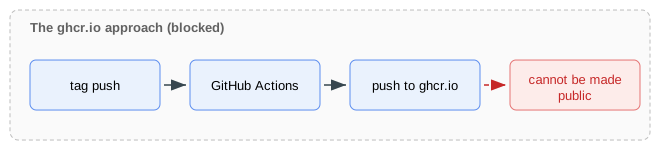
I first tried a common GitHub release pattern: using GitHub Actions to publish
images to ghcr.io on a tag push
(cluster-inventory-api#40).
The workflow succeeded, but Kubernetes GitHub organizations keep GHCR packages
private, so GHCR cannot be used for public distribution.
As described in the
registry.k8s.io documentation,
official images take a different route:
Prow (the Kubernetes project’s CI/CD system)
picks up a tag push and runs Google Cloud Build on Kubernetes-owned
infrastructure to push the image to a staging registry, and the image promoter
then copies it to registry.k8s.io.

The first-time setup, step by step
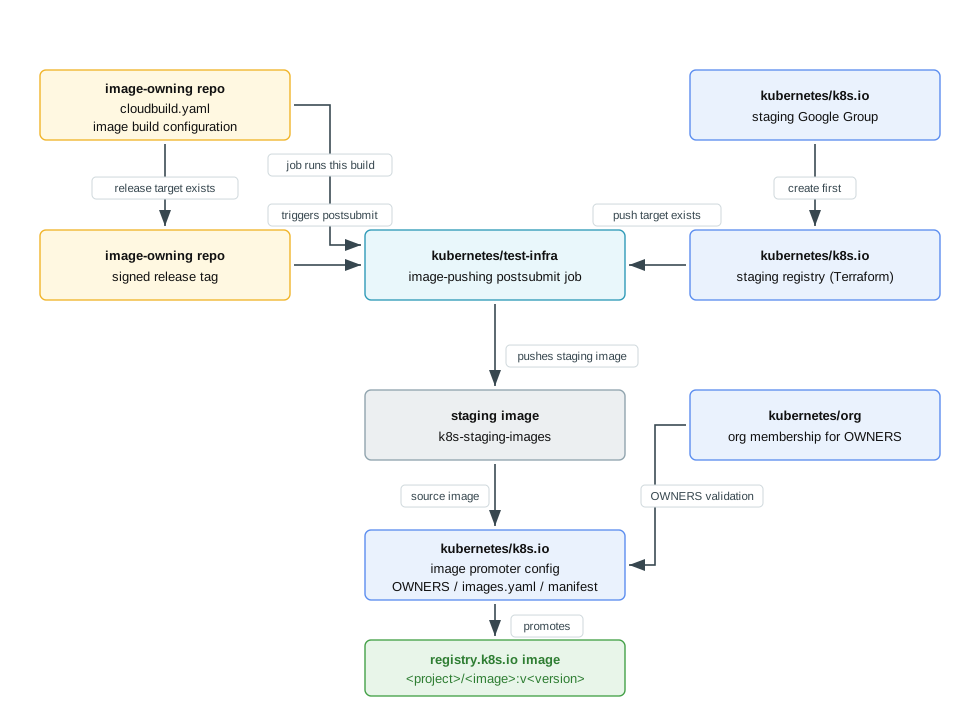
Besides the image-owning repository, this touches three infrastructure
repositories: kubernetes/k8s.io,
kubernetes/test-infra, and
kubernetes/org. The pieces depend on
each other like this:
Before you start: decide your project details
Before setting up the publishing workflow, decide a few project-specific details. These values will be reused throughout the setup when creating the staging registry, configuring image builds, and setting up image promotion:
<project>, which determines the staging registry pathus-central1-docker.pkg.dev/k8s-staging-images/<project>.<image>for each image you ship.- Decide how your project will version releases.
For the Cluster Inventory API example, these values form
registry.k8s.io/cluster-inventory-api/secretreader:v0.1.3, where <project>
is cluster-inventory-api, <image> is secretreader, and <version> is
0.1.3.
1. Set up your project repository to build images
Before Kubernetes infrastructure can build and publish your images, the image-owning repository must define how they are built. As described in the image-pushing documentation, this requires:
- a
RELEASE.mddocumenting the release steps, - a
cloudbuild.yamlfile that invokes the project’s image build and push process, - the project-specific build configuration invoked by
cloudbuild.yaml. See the build example.
References:
cluster-inventory-api#53
(moving to the Prow/Cloud Build approach) and
cluster-inventory-api#57
(passing the staging repository explicitly to kpromo).
2. Add a Google Group for staging artifacts
Kubernetes uses a Google Group to control who can push images into the staging registry. Before the registry can be created, this group must exist.
Create a Google Group named
k8s-infra-staging-<project-name>@kubernetes.io in your SIG’s
groups/ configuration
in kubernetes/k8s.io. After the PR merges, Kubernetes infrastructure creates
the group automatically. For example, see
kubernetes/k8s.io#9385.
Keep the <project-name> suffix within the 18-character limit. See
kubernetes/k8s.io#9402 for an
example where the group name was shortened to meet this requirement.
3. Add a staging registry in kubernetes/k8s.io
Add one entry to the registries map in
infra/gcp/terraform/k8s-staging-images/registries.tf, mapping <project> to
the group from step 2. The module gives that group writer access and makes the
repository publicly readable. Reference:
kubernetes/k8s.io#9347.
4. Add an image-pushing postsubmit job in kubernetes/test-infra
Add a job under config/jobs/image-pushing/ that runs the image-owning
repository’s cloudbuild.yaml on a tag push and pushes to the staging
registry. See the
Prow config template.
For reference:
kubernetes/test-infra#36821.
5. Push a release tag to build a staging image
With everything above in place, push a signed tag from the image-owning repository:
git tag -s v<version>
git push origin v<version>
gh release create v<version> --draft --generate-notes --verify-tag
Verify that the image was successfully published to the staging registry.
Tag events are not processed retroactively: tags created before the release pipeline existed will not produce a staging image.
Note
Staging registries have a 90-day retention policy and are intended only for intermediate builds. End users should consume images fromregistry.k8s.io after they have been promoted.6. Add the image promoter configuration in kubernetes/k8s.io
At this point, the image exists only in the staging registry. The next step
configures the Image Promoter, which copies approved images into the public
registry.k8s.io registry.
Open a kubernetes/k8s.io PR that adds the promotion configuration for this
project
(kubernetes/k8s.io#9499):
registry.k8s.io/images/k8s-staging-<project>/OWNERS,registry.k8s.io/images/k8s-staging-<project>/images.yaml(the promotion target),registry.k8s.io/manifests/k8s-staging-<project>/promoter-manifest.yaml.
The promoter-manifest.yaml file stores credentials and other registry
metadata, while images.yaml stores the image data. The OWNERS file lets more
project members approve new images for promotion.
For the first promotion, include the digest and tag entries for the staging
images in images.yaml, and get /lgtm from a SIG lead. For later releases,
follow the routine release steps below to create the promotion PR with
kpromo. If you are curious how the promotion machinery works, see
The Invisible Rewrite: Modernizing the Kubernetes Image Promoter.
If anyone you plan to list in OWNERS is not yet a Kubernetes organization
member, submit a membership request first
(kubernetes/org#6385,
kubernetes/org#6386).
7. Verify the release and publish it
Once the promotion PR merges, the image promoter workflow publishes the image
from the staging registry to registry.k8s.io. The promotion is handled by
Kubernetes CI jobs:
post-k8sio-image-promoruns after the merge and performs the promotion.ci-k8sio-image-promoperiodically retries promotions in case of transient failures.
Verify that the promotion jobs complete successfully and that the image is
available from registry.k8s.io.
When that works, publish or update the GitHub release and announce it in the related issues and Slack channels.
For Cluster Inventory API, completing these steps made both images publicly available:
registry.k8s.io/cluster-inventory-api/secretreader:v0.1.3
registry.k8s.io/cluster-inventory-api/kubeconfig-secretreader:v0.1.3
Where to ask for help
Several of these steps depend on other people: reviewers, approvers, and SIG leads. Expect to wait on reviews between steps rather than finishing in one sitting. On the Kubernetes Slack, these channels line up with the work:
| Channel | Use it for |
|---|---|
#github-management | Repository access, Kubernetes organization membership, and GitHub-related questions |
#sig-k8s-infra | The staging Google Group, staging registry, and image publishing infrastructure |
After the first time, it is much lighter
Routine releases only touch the image-owning repository and one promotion PR:
Push a signed tag, create a draft GitHub release, and confirm the postsubmit pushed the staging image, as in step 5 of the first-time setup.
Follow the promotion pull request guide and create the promotion PR with
kpromo pr, naming the Artifact Registry staging repository explicitly with--staging-repo:kpromo pr \ --fork <your-github-username> \ --project <project> \ --tag v<version> \ --staging-repo us-central1-docker.pkg.dev/k8s-staging-images/<project>Once the promotion PR is reviewed and merged, finish as in step 7 of the first-time setup.
Acknowledgments
Thanks to Mike Ng and
Laura Lorenz for attending meetings on my
behalf, connecting me with the right people, and coordinating the work across
SIG Multicluster; Jian Qiu for reviewing the
implementation;
Stephen Kitt for reviewing the release process and
clarifying the publishing rules; and
Arnaud M. for reviewing the kubernetes/k8s.io
pull requests and guiding the infrastructure and promotion changes.